QCad3.26.0
2D CAD system for Linux.
- Multimedia
- Graphics
- Editors
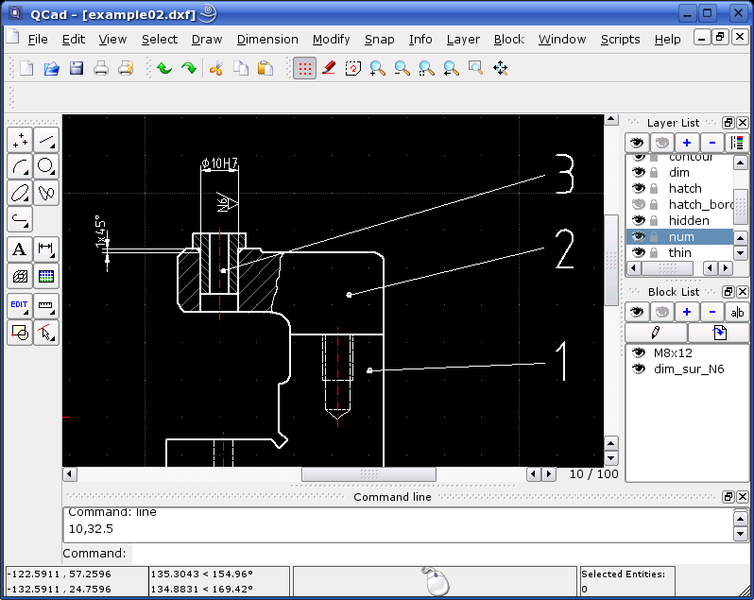
QCad is a multiplatform 2D CAD system. Unlike other CAD systems it's very easy to use and has a clear and consequential user interface.
- linux
- windows
- MacOS
- Downloads17113
- LicenseGPL
- PlatformsLinux, Alpha Linux, Alpha Tru64, Linux PPC, FreeBSD, Solaris, Windows, Mac OS X
- Tags
Downloads / Release History
- qcad-downloads-trial
- qcad-3.24.3-trial-linux-x86_64.run
- qcad-3.24.3-trial-win32-installer.msi
- qcad-downloads-trial
- qcad-3.23.0-trial-linux-x86_64.run
- qcad-3.23.0-trial-win32-installer.msi
- qcad-downloads-trial
- qcad-3.22.1-trial-linux-x86_64.run
- qcad-3.22.1-trial-win32-installer.msi
- qcad-downloads-trial
- qcad-3.22.0-trial-linux-x86_64.run
- qcad-3.22.0-trial-win32-installer.msi
- qcad-downloads-trial
- qcad-3.21.2-trial-linux-x86_64.run
- qcad-3.21.2-trial-win32-installer.msi
- qcad-downloads-trial
- qcad-3.21.1-trial-linux-x86_64.run
- qcad-3.21.1-trial-win32-installer.msi
- qcad-downloads-trial
- qcad-3.20.1-trial-linux-x86_64.run
- qcad-3.20.1-trial-win32-installer.msi
- qcad-downloads-trial
- qcad-3.19.2-trial-linux-x86_64.run
- qcad-3.19.2-trial-win32-installer.msi
- qcad-downloads-trial
- qcad-3.18.0-trial-linux-x86_64.run
- qcad-3.18.0-trial-win32-installer.msi
- qcad-downloads-trial
- qcad-3.17.3-trial-linux-x86_64.run
- qcad-3.17.3-trial-win32-installer.msi
- qcad-downloads-trial
- qcad-3.17.2-trial-linux-x86_64.run
- qcad-3.17.2-trial-win32-installer.msi
- qcad-downloads-trial
- qcad-3.17.1-trial-linux-x86_64.run
- qcad-3.17.1-trial-win32-installer.msi
- qcad-downloads-trial
- qcad-3.17.0-trial-linux-x86_64.run
- qcad-3.17.0-trial-win32-installer.msi
Related Apps

Comments

Nice work ! There is only one thing I can say : Could objects be selected in an easier way ? For example, a menu could be always visible for selection... Thank you for this software and the french version and excuse my poor english !
That is the only thing I think it lacks!
A fantastic introlevel CAD app. However (sorry), I have a lot of trouble scaling / and printing to scale. Rulers / Guides would help. Ability to set a scale would be a great asset. Or maybe I've been missing something. Peter. South Australia
I found QCad easy to use after a little trial and error. It is much better than many of the mass market CAD tools. (low cost) I would have liked an option to group elements to have them treated as a single object. It will be good when the object libraries are avalible. I would like to see a 3D version.
It's very easy to install. It's good to have: 1. More colors choice. 2. Zoom previous 3. Print area selection
Guys, this thing really rocks. I now worked with it for a few weeks on some hobby projects in building historical instruments. Beeing familiar with other CAD systems (profession is civil engineering), I still find some real good features other programs are missing. And the best of all is even if you hardly ever heard of CAD, it's surprisingly easy to understand. Learning the basics and completing your first drawings is less than an an hour away. Some features still need improvement, but all implemented functions are fully satisfying and working. Haven't noticed any glitches or errors. If you need a CAD - QCAD is it!
Very good user interface, I had no problem to start working in one hour. One of the best freeware CAD programs I've ever seen. Just a little poor WYSIWYG. There is still a lot to do, but I enjoy working with it!
Very good but lacks an ellipse drawing tool to allow more creative designs to be constructed.
Qcad is really nice and able to make professional drawings. At work I use AutoCad 14, which is a little better than Qcad. But so is the Price !!! I think that Qcad will be a serious concurent to Autocad with just a little more development. One (only) thing that i dont like in Qcad is the menu (or buttons) that you have to click back and forth all the time (right click to go back in the menu). It would be easier if one could configure how many buttons are visible at once (i would like more) like it is in Autocad. But all in all I'am very happy for my qcad. :-). Keep up the good work :-)))))
I just received my version of QCad for Linux CONNECTIVA (BR) version 5.0. It is very good to work in small draws! (A4) The QCad works like BlueCad (Italian software for OS/2 and Windows) Now I have a CAD tool for Linux, a very easy tool. Go ahead whith the project and good luck! Angelo Castro - Engenheiro de Fort. e Const. Resende, Rio de janeiro, Brasil
Very Clean! Easy to use and incredably well coded. The only reason a 4 and not a 5 is the lack of elipses. ( and they are working on it! )
Very good 2d cad, the only thing I want to be better is, 1. there should be an hpgl export 2. its not able to choose between mechanical and architectural standarts (only mechanical)
Very promising program. As soon as it will have some extensions in special architectural funcions it will hopefully bust the monopolies of autdesk, nemetschek and so.
I need to give my files to people that use AutoCAD and even though QCAD is perfect for my needs and so easy to use I started right away I now have to use AutoCAD because they can't open my dxf files in AutoCAD :-(
Yes, I had the same problem. Can't share my dxf files with acad users. I'll just have to wait until they see the light and switch to qcad. But seriously, It is strange though because it is a set standard, isn't it? L.
Quick and easy to learn. Very Functional for my needs. I would have rated it a 5, but I have difficulty deleting points and line segments. I'm running QCad from the Mandrake 8.0 distribution. It loaded perfectly and is very stable. Thanks for the effort.
I was training as a draftman on drawing boards, .i.e. a long time ago, and have only very occasionally used CAD systems. I would class QCad in the "sketch" tool category, but I found it very easy to use. I learnt most of it in an hour or so and was able to draw up the complete construction details of a timber deck in a day. There are a couple of minor bugs which didn't prevent me from doing what I wanted, and there are a few things that I would like to see added. But overall, a great piece free of software.
I'm not a CAD user but after read the introduction of the QCad's manual, I immediately design my house. Many tanks to the authors about the beautyfull interface of QCad!
It was somewhat hard to understand how to match page sizes to drawing layout sizes. People with access to a roll size plotter need tools to rotate the image in the direction of paper feed, and to size it to the roll size (I know, I know, printer manufacturer supplies drivers) but their interfaces are not always easy to work either.
Qcad could be ok. But his creator forgot that the software should be user friendly. You cannot pan through the image! You have to zoom out then click the centre of requested view, and then zoom in again ! What IDEA ! After while you want to hit your computer right between its eyes. Adding two sliders could make QCad a very usable CAD. Some sort of this feature exists in the wishlist but (sic!) with the LOWEST PRIORITY .... pity
Great tool! - adding shp (http://gdal.velocet.ca/projects/shapelib/index.html) functionality will make QCad very usefull for GIS users...
Does everything it promisses. (therefore I gave it a 5) It can be used to do what is needed in 2D-drawing. I enjoy working with it, now that I got the hang of it. I could think of things to be included and sometimes it just turns to work quite slow without me having an idea why.
Spent 2 hrs having a look at qcad version 1.4.6 on my Mandrake 8.2 system - Good points: . free . professional look and feel . excellent documentation Needs more work: . some must-have features not there yet, such as arrows for panning the view left right etc. . tried to draw a large rectangle 600mm x 2mm - couldn't find a way to do it - seem to have to zoom out and then in again, loses the rectangle drawing mode . a couple of bugs showed up - elements created in one layer ended up in another This is great work, I am very interested in seeing newer versions A.B
Great program. I've just finished drawing my new house. Takes a bit of practice to use it when you learn it. It great!!!! Good work. Keep it up. Rasmus, Denmark